Recording a Reason for a Timesheet Correction
The current correction form does not provide a reason box. A return/rejection reason and an entry’s correction history are separate.
Last updated About 2 hours ago
The current correction form does not provide a reason box. A return/rejection reason and an entry’s correction history are separate.
1. Keep the supporting facts
Record the staff member, work date, original value, verified correction and reason in your organization’s approved recordkeeping location.
2. Use the available correction fields
Correct permits clock times and break minutes. Do not look for a reason field that is absent.
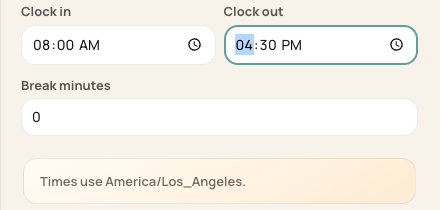
This is the current correction-field layout.
3. Use Return for the appropriate review case
For eligible non-approved entries, Reject selected opens a required Reason field. That reason explains a returned entry; it is not an automatic reason attached to every later correction.
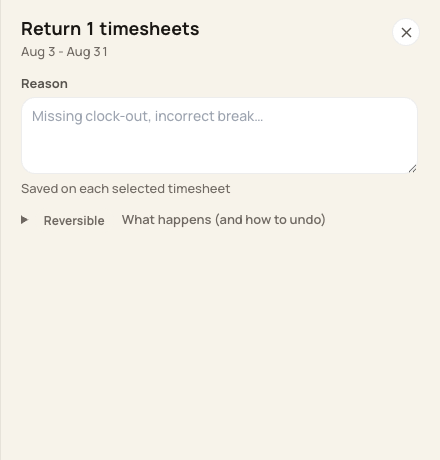
The Return form has a reason field; the Correct form currently does not.
4. Verify the audit context
Corrections record before/after values and the actor in the system audit. Contact Support if you need a record that is not exposed in the Timesheets interface.
Before you finish
Do not treat an audit entry or Adjusted label as proof a human explanation was captured.
Related guides
Screenshots show an example center. Pay periods, approval, rounding, breaks and overtime settings depend on your organization’s configuration.
Was this helpful?