Handling Staff Without Payroll Codes or Pay Rates
Resolve missing setup using the correct staff and payroll records.
Last updated About 2 hours ago
Resolve missing setup using the correct staff and payroll records.
1. Identify the missing information
Open Staff & setup and expand Staff pay rates. Review Not set values rather than assuming zero pay.
2. Verify staff identity and status
Confirm the correct person and whether an invitation still needs acceptance. Do not create duplicate staff identities to bypass setup.
3. Complete the agreed details
Use the pay-rate form to enter the appropriate compensation, effective date and provider code.
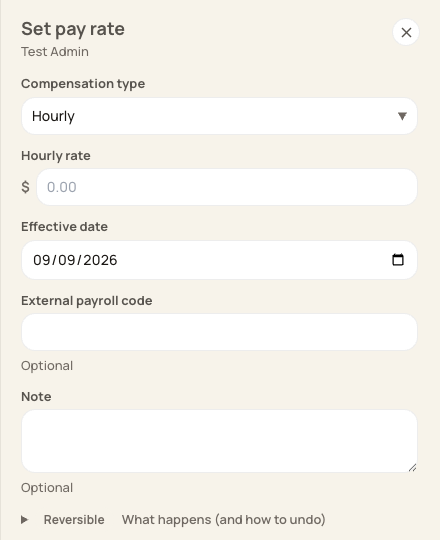
Complete setup from an authoritative compensation agreement and provider employee record.
4. Reconcile hours separately
Missing setup does not mean the person has no worked hours. Check the timesheet export and provider mapping before processing.
Before you finish
Pay rates and payroll codes serve a different purpose from the hours and approval status saved on a timesheet.
Related guides
Screenshots show an example center. Pay periods, approval, rounding, breaks and overtime settings depend on your organization’s configuration.
Was this helpful?