Placing a Meal Order for a Child
Authorized staff can place an order on a child’s behalf from the order ledger.
Last updated About 3 hours ago
Authorized staff can place an order on a child’s behalf from the order ledger.
1. Check for an existing order
Open Meals → Orders. Search the child, date and meal before placing an order so you know whether you are creating or changing that combination.
2. Enter the order details
Choose Place order. Select the child, meal and service date. Review the Dish choices when shown; choose the intended dish or kitchen default.
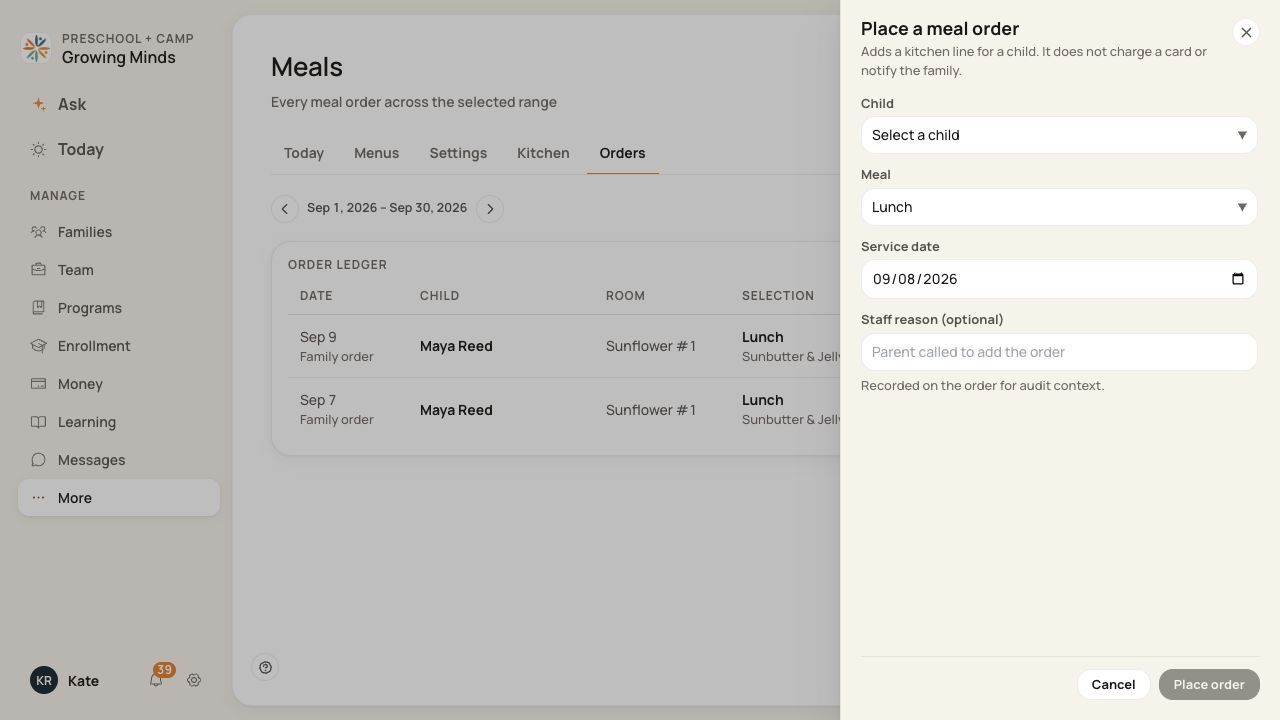
Verify the child, service date and dish together.
3. Add context and review
Enter a staff reason if useful, such as a family request. Check the selected details and your center’s agreement before saving.
4. Place and verify
Choose Place order, wait for success and find the order in the ledger. Open it to check the dish, price and Ordered status.
Before you finish
This staff action records an order and its pricing; it does not charge a card immediately or send a family notification. Billing is a separate process.
Placing the same child/date/meal combination can update that existing order rather than add a second one. Do not use it to record a second portion.
Staff ordering is not evidence that the family ordering deadline is still open. Follow your center’s policy.
Related guides
Screenshots show an example center. Meal prices, times, service days and ordering policies depend on your center’s configuration.
Was this helpful?