Timesheets: Special Cases and Current Limits
Use these answers when a workflow needs more than a standard same-day timesheet.
Last updated About 2 hours ago
Use these answers when a workflow needs more than a standard same-day timesheet.
1. Overnight and split shifts
Schedule fill reports unresolved multiple shifts or overnight shifts instead of guessing. Check the fill preview, resolve the source or use an approved manual correction process. Never duplicate the same worked interval.
2. Paid leave and additional earnings
The hours exports do not provide dedicated PTO, sick-leave, holiday-pay or paid-training earning-code columns. Confirm these categories separately in your payroll process; their absence is not a zero-pay rule.
3. Rounding, breaks and overtime
Review Staff & setup → Pay period settings → Advanced calculation rules. Your organization controls the settings. A configured rule is not a legal compliance determination.
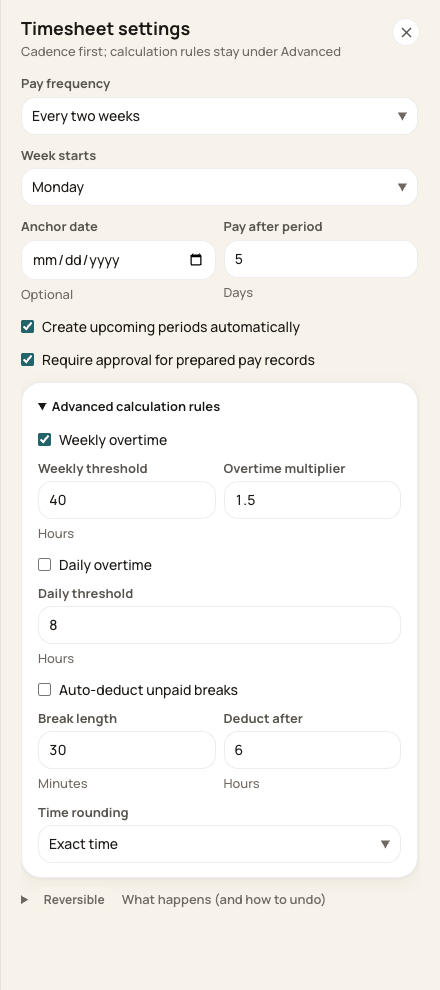
Calculation values shown are organization-specific examples.
4. Staff review, signing and notifications
These administrator guides do not establish a staff self-service signing, rejection notification or missing-punch reminder workflow. PDF signature lines support paper review. Confirm a separate enabled workflow before promising employees an automatic notification or digital signature.
5. Retention and payroll compatibility
Keep reviewed exports and provider receipts under your approved recordkeeping policy. Confirm any specific retention period or provider-required format with Support and the provider; do not assume direct export creates a permanent download history.
Before you finish
If your process depends on a feature not represented here, confirm the exact workflow before the payroll deadline.
Related guides
Screenshots show an example center. Pay periods, approval, rounding, breaks and overtime settings depend on your organization’s configuration.
Was this helpful?