Understanding Hourly and Salaried Compensation Types
Choose the compensation type that matches the staff member’s agreement.
Last updated About 3 hours ago
Choose the compensation type that matches the staff member’s agreement.
1. Choose Hourly for an hourly rate
Enter the agreed amount per hour. Do not enter the annual total in this field.
2. Choose Annual salary for a yearly amount
Enter the agreed annual salary, not the amount of a single paycheck.
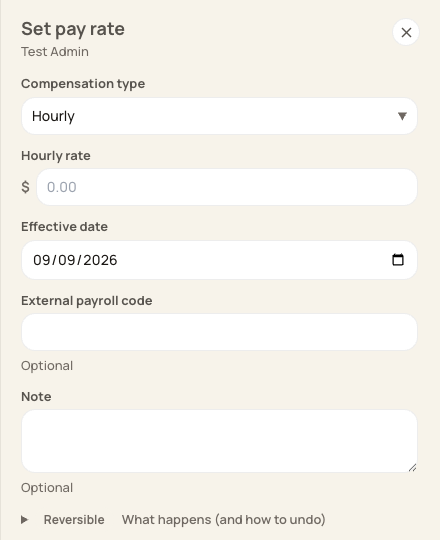
The compensation-type selector determines what the rate represents.
3. Keep tracking hours where required
A salaried staff member can still have timesheet entries. The timesheet export reports filed hours; it does not calculate the staff member’s final salary payment.
4. Confirm provider setup
Ensure the provider has the correct pay type, rate and any applicable treatment of extra hours.
Before you finish
Selecting a pay type does not determine legal overtime eligibility. Use the classification approved for the staff member.
Related guides
Screenshots show an example center. Pay periods, approval, rounding, breaks and overtime settings depend on your organization’s configuration.
Was this helpful?