Understanding Current, Ended, and Historical Pay Periods
Calendar timing and workflow state are separate. A past period can still need review.
Last updated About 2 hours ago
Calendar timing and workflow state are separate. A past period can still need review.
1. Check the selected dates
Read the range in the Timesheets heading.
2. Interpret the timing label
A label such as Ended tells you where the dates fall relative to today. It does not confirm approval or payment.
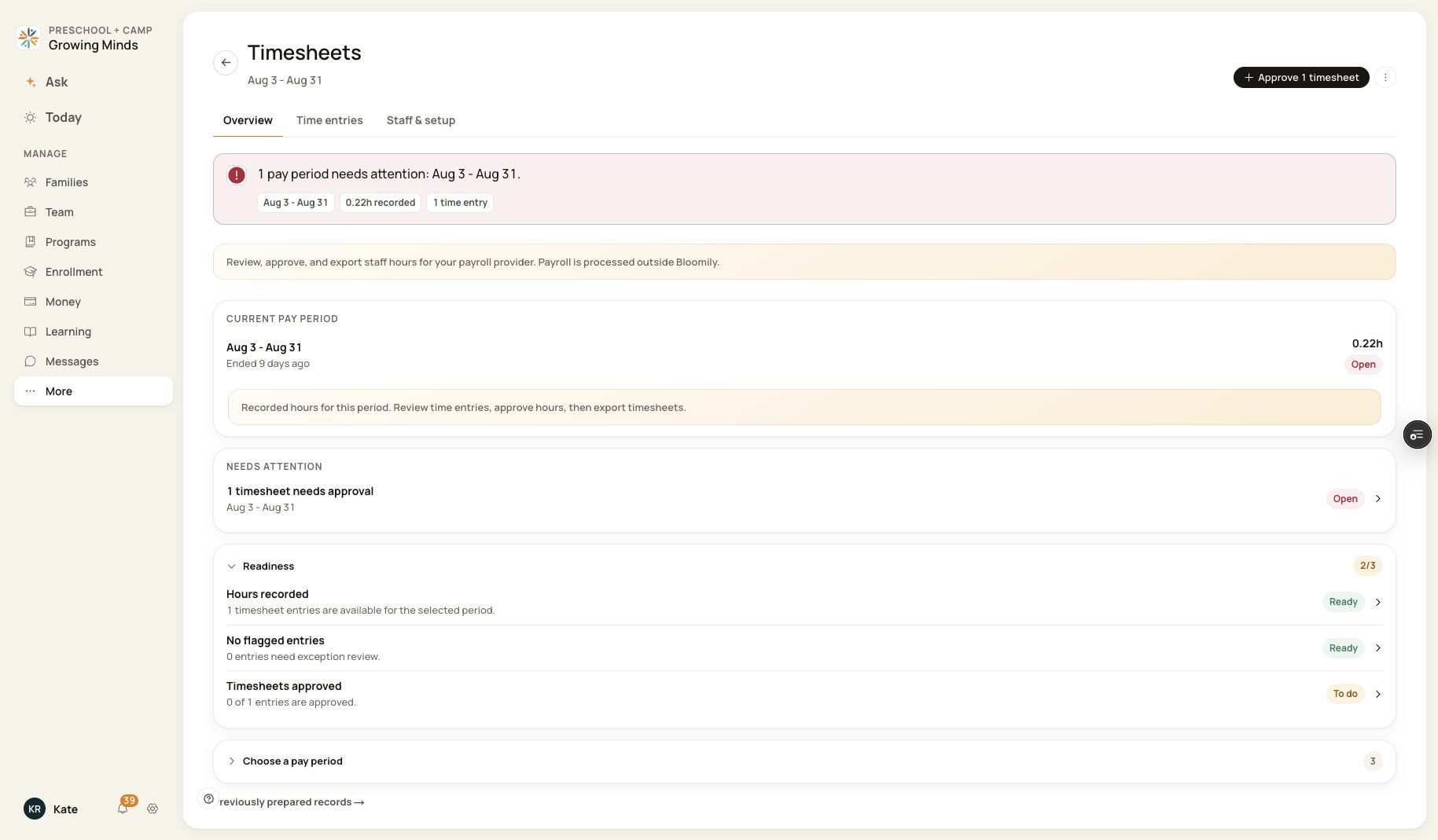
Ended and Open can appear on the same period.
3. Check Open or Locked separately
Use the state badge and readiness checks to determine whether review is outstanding.
4. Choose older periods intentionally
Use Choose a pay period to review historical dates; use Previously prepared records for records prepared for that selected period.
Before you finish
Do not infer that historical hours are immutable solely because the period ended. Conversely, do not assume an old export still matches edited hours.
Related guides
Screenshots show an example center. Pay periods, approval, rounding, breaks and overtime settings depend on your organization’s configuration.
Was this helpful?