Choosing Between Scheduled Hours and Actual Attendance
Choose the source that reflects the hours you intend to review, and check existing coverage before mixing sources.
Last updated About 3 hours ago
Choose the source that reflects the hours you intend to review, and check existing coverage before mixing sources.
1. Start with recorded work
Review Team → Attendance where reliable punches exist. Confirm missing or partial records with the responsible staff member.
2. Use schedule fill deliberately
Published shifts can fill missing timesheet days, but planned hours must still be checked against actual work.
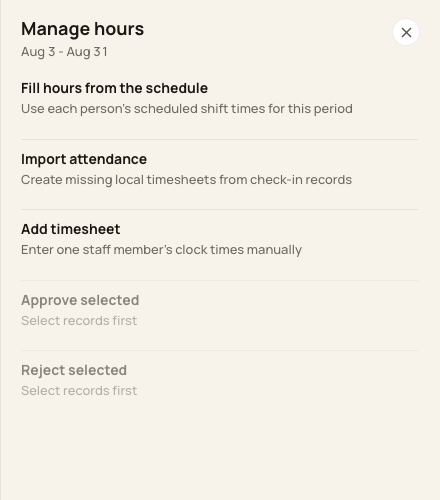
Attendance import and schedule fill are separate actions.
3. Check which record already exists
Schedule fill leaves any existing staff/day timesheet alone. Attendance import deduplicates linked source records; do not assume it replaces schedule or manual hours.
4. Resolve differences on the filed entry
Review the correct timesheet and use an eligible correction. If two records cover the same work, resolve the discrepancy before approval/export.
Before you finish
There is no universal “attendance wins” or “schedule wins” rule for every existing entry.
Compare the complete day, including breaks and multiple punches.
Related guides
Screenshots show an example center. Pay periods, approval, rounding, breaks and overtime settings depend on your organization’s configuration.
Was this helpful?